Vector Spaces
-
Think of a Vector Space as a specific kind of playground where mathematical objects live, and each object is called a vector.
-
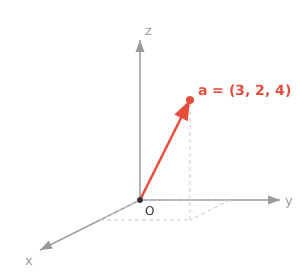
For geometric intuition in machine learning (ML), we will always think of vectors as a point in Euclidean space, represented by it's coordinates.
-
The vector $\mathbf{a}$ (denoted mathematically as lowercase letters in bold) has $n$ coordinates, each representing a position along an axis.
$$\mathbf{a} = [a_1, a_2, a_3]$$
-
The vectors in the vector space live under a very specific, unbreakable set of rules:
-
Vector Addition (Combining): You can take any two vectors and combine them to create a new one. Think of vectors as instructions for movement. If vector A means "walk 3 steps forward" and vector B means "walk 2 steps right," adding them (A + B) creates a new, single instruction: "walk 3 steps forward and 2 steps right."
-
Scalar Multiplication (Scaling): You can take any vector and scale it using a regular number (a "scalar"). You can stretch it, shrink it, or reverse it. If vector A is "walk 3 steps forward," scaling it by 2 makes it "walk 6 steps forward." Scaling it by -1 flips it entirely to "walk 3 steps backward."
-
-
The dimension of a vector space is the number of independent directions it contains. $\mathbb{R}^2$ is 2-dimensional (needs 2 coordinates), while $\mathbf{a}$ above lives in $\mathbb{R}^3$.
-
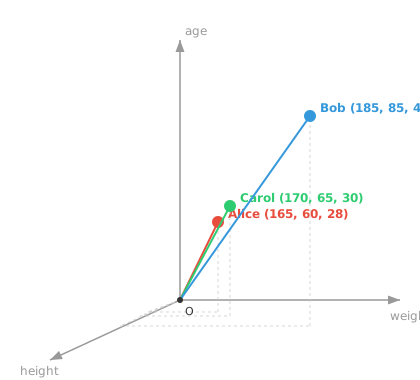
We can for instance represent any object, say, a human, as a vector, where $h_1$ = height in cm, $h_2$ = weight in kg, $h_3$ = age.
$$\mathbf{h} = [185, 75, 30]$$
-
We have now created a vector space with a vector representing a human.
-
We can represent multiple humans, and see how close or apart they are!
-
We can add more features, creating a rich representation of a human, often called feature vectors in ML.
-
The more unique and meaningful features you have, the more descriptive the feature vector is, an important factor to remember.
-
Beyond 3 dimensions, vectors become very difficult to visually inspect, inspiring a field of mathematics called Linear Algebra.
-
Now, Linear algebra is the study of vectors, vector spaces and mappings between vectors.
-
We represent almost every thing in AI/ML as vectors, making linear algebra the bedrock of the field.
-
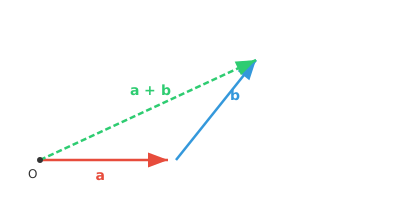
Vector addition can be performed by placing one vector on the tail of the other visually, and drawing from the origin to the endpoint.
-
For two vectors $\mathbf{a} = (a_1, a_2)$ and $\mathbf{b} = (b_1, b_2)$: $\mathbf{a} + \mathbf{b} = (a_1 + b_1, a_2 + b_2)$
-
Vectors can also be subtracted, with all addition rules applying too.
-
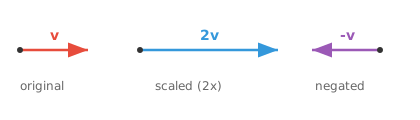
Multiplying a vector by a scalar scales the vector by that factor in the same direction.
-
For a scalar $c$ and vector $\mathbf{v} = (v_1, v_2)$: $c\mathbf{v} = (cv_1, cv_2)$
-
Closure under Addition: If you add any two vectors from the vector space, the result is also a vector within the same space: If $\mathbf{u} \in V$ and $\mathbf{v} \in V$, then $\mathbf{u} + \mathbf{v} \in V$
-
Closure under Scalar Multiplication: If you multiply any vector from the vector space by a scalar, the result is a vector within the same space: If $\mathbf{v} \in V$ and $c \in F$, then $c\mathbf{v} \in V$
-
Associativity of Addition: For any three vectors $\mathbf{u}$, $\mathbf{v}$, and $\mathbf{w}$: $(\mathbf{u} + \mathbf{v}) + \mathbf{w} = \mathbf{u} + (\mathbf{v} + \mathbf{w})$
-
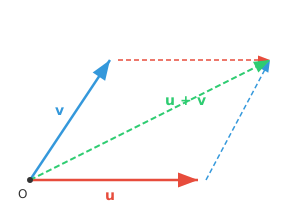
Commutativity of Addition: For any two vectors $\mathbf{u}$ and $\mathbf{v}$: $\mathbf{u} + \mathbf{v} = \mathbf{v} + \mathbf{u}$
-
Both paths through the parallelogram arrive at the same point.
-
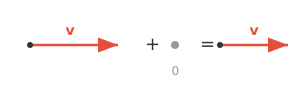
(Zero Vector): There exists a vector $\mathbf{0}$ such that for any vector $\mathbf{v}$: $\mathbf{v} + \mathbf{0} = \mathbf{v}$
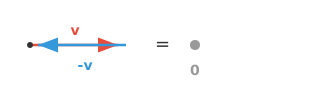
- Additive Inverse: For every vector $\mathbf{v}$, there exists a vector $-\mathbf{v}$ such that: $\mathbf{v} + (-\mathbf{v}) = \mathbf{0}$
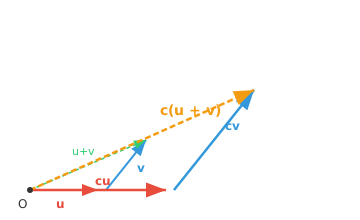
- Distributivity 1: For any scalar $c$ and vectors $\mathbf{u}$, $\mathbf{v}$: $c(\mathbf{u} + \mathbf{v}) = c\mathbf{u} + c\mathbf{v}$
-
Scaling the sum (gold) gives the same result as summing the scaled vectors.
-
Distributivity 2: For any scalars $c$, $d$ and vector $\mathbf{v}$: $(c + d)\mathbf{v} = c\mathbf{v} + d\mathbf{v}$
-
Associativity: For any scalars $c$, $d$ and vector $\mathbf{v}$: $(cd)\mathbf{v} = c(d\mathbf{v})$
-
Identity Element: For any vector $\mathbf{v}$: $1\mathbf{v} = \mathbf{v}$, where $1$ is the multiplicative identity in the field of scalars.
-
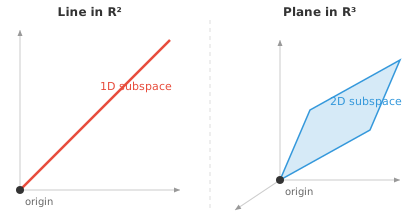
A subspace is just a smaller playground inside the bigger one. Imagine 3D space as a room. A flat sheet of paper passing through the centre of the room is a subspace, and so is a single straight wire through the centre.
-
The key requirement is that the subspace must pass through the origin. If you shift that sheet of paper off-centre, it stops being a subspace because the zero vector is no longer on it.
-
All the same rules from the vector space (addition, scaling, closure) still work inside a subspace. You can add or scale vectors within it and never "fall off" into the larger space.
-
A line through the origin is a 1-dimensional subspace, a plane through the origin is a 2-dimensional subspace, and the full space is a subspace of itself.
-
In ML, subspaces appear naturally. High-dimensional data often has structure that lives on a lower-dimensional subspace. Techniques like PCA find that subspace so we can work with the data more efficiently.
Coding Tasks (use CoLab or notebook)
- Run code to verify the distributivity property, then Modify and play around to test other rules!
import jax.numpy as jnp

u = jnp.array([1, 2])
v = jnp.array([3, 0])
c = 2

lhs = c * (u + v)
rhs = c*u + c*v

print(f"LHS: {lhs}")
print(f"RHS: {rhs}")
- Run code to visualise different vectors, then modify values for different coordinates to understand how each axis affects position.
import jax.numpy as jnp
import matplotlib.pyplot as plt

# Try changing these vectors!
a = jnp.array([3, 2, 4])
b = jnp.array([1, 4, 2])
c = jnp.array([4, 1, 3])

fig = plt.figure()
ax = fig.add_subplot(111, projection="3d")

for vec, name, color in [(a, "a", "red"), (b, "b", "blue"), (c, "c", "green")]:
    ax.quiver(0, 0, 0, *vec, color=color, arrow_length_ratio=0.1, linewidth=2, label=name)

lim = int(jnp.abs(jnp.stack([a, b, c])).max()) + 1
ax.set_xlim([0, lim]); ax.set_ylim([0, lim]); ax.set_zlim([0, lim])
ax.set_xlabel("X"); ax.set_ylabel("Y"); ax.set_zlabel("Z")
ax.legend()
plt.show()